
Deployment Manager for SMB & Enterprise

 Deployment_Manag_5269119d14dd0.png
Deployment Manager is a powerful solution for multicast or individual deployment and re-imaging over LAN or from bootable media.
It is great forSMBs as well as large organizations, computer labs, and any type of public-access computers (PAC), such as libraries,
Internet Cafés, gaming centers, etc.
Why Deployment Manager 10?
- Unattended or manual local deployment – the easiest way to deploy a computer is to use our bootable Linux/DOS or
WinPE 3.0 environments.
So you won't need to set up and use any network infrastructure at all. Both environments offer a user-friendly interface
and are reach in customization options. They can also be used as an efficient last resort tool (System Recovery Solution)
o get your system back on track in
most emergency cases. - Fully-automated or manual (with bootable media) re-deployment of the required configuration over the
network (most suitable for a classroom or Internet café) - that is the classical application of our product. With the
Deployment Manager console you can easily create and schedule (thanks to the built-in scheduler) deployment
sessions for different groups of computers. - Client-driven single or mass deployment over the network – with this functionality you're free to initiate the
deployment procedure directly from the target PC with no need of the central console. It can be done manually or
in the unattended mode. If two or more targets ask for the same image then the multicast protocol will automatically
come at scene. That's how flexibility of a client-driven deployment in combination with the multicast technique is achieved.
all client-driven sessions history will be logged and can be controlled from the central deployment console. - Crashed PC re-deployment (Deployment Manager + Drive Backup) – Deployment Manager is fully compatible
with Drive Backup and Hard Disk Manager. Thus images initially created for the data security purposes can easily be used
for deployment and vice versa. - PC life-cycle maintenance – Deployment Manager includes Hard Disk Manager as one of its components. That's why
you can use its functionality for life-cycle maintenance of master PCs and workstations:- Exclusive drive partitioning
- Backup and disaster recovery
- Optimization and defragmentation
- Advanced recovery environments
- System and data migration
- Data sanitization
-
Product Structure:
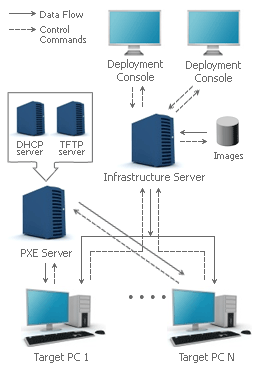
 Deployment Console for centralized initiation, management and monitoring of deployment sessions.Infrastructure Server is the crucial element of the program's architecture to deliver images to target computers.PXE Server to remotely boot client computers via LAN. Integration with an external DHCP server.
 Boot Media Builder to create bootable CD/DVD or PXE images based on Linux/DOS and WinPE 3.0.
 Hard Disk Manager for PC maintenance, backup, migration, optimization and recovery. Adaptive Imaging Tools to prepare a universal image for further deployment to various machines
Manufacturer News
Manufacturer News
Support Center
For technical support email or call us on:
- support@tituscorp.co.za
- Tel: 27 (0) 11 705 1930
- Fax: 27 (0) 11 705 1644


