
Deployment Manager

 Deployment_Manag_52690f1dedf06.png
Deployment Manager is a powerful multicast deployment solution that allows deployment of a master image to 1000’s of systems simultaneously. It includes all facilities for smooth fully automated server-driven mass deployment, client-driven single or mass deployment as well as unattended or manual local deployment. It supports alternative deployment tools, like WDS/BDD/Images and fully integrates with Microsoft Sysprep and Sysinternals.
Why Deployment Manager 10?
- Fully automated server-driven mass deployment of a bare metal PC over the network - with the central deployment console you will be able to create and launch an unlimited number of deployment sessions in parallel. Computers connected to the already running multicast session will be deployed asynchronously, thus considerably reducing the overall deployment time. A sofisticated logging and counter systems will make your job particularly effective.
- Client-driven single or mass deployment over the network - with this functionality you're free to initiate the deployment procedure directly from the target PC with no need of the central console. It can be done manually or in the unattended mode. If two or more targets ask for the same image then the multicast protocol will automatically be initiated. That is how the flexibility of a client-driven deployment in combination with the multicast technique is achieved. All client-driven sessions history will be logged and can be controlled from the central deployment console.
- Unattended or manual local deployment - the easiest way to deploy a computer is to do it with the bootable Linux/DOS or WinPE recovery environments. In this case you won't need to set up and use any network infrastructure at all. Both recovery environments offer a user-friendly interface and are rich in customization options. They can also be used as an efficient last resort tool (System Recovery Solution) to get your system back on track in most emergency cases.
- Paragon Multicast Engine for easy work with alternative deployment tools, like WDS/BDD/ImageX - Deployment Manager comes with an easy API and examples how to use its multicast engine to deliver, for instance, .wim images and other tools. Thus you can use Paragon Deployment API together with such Microsoft tools as ImageX, with no need of a crucial change of the technological process, but only by modifying the deployment scripts.
- PC life-cycle maintenance – Deployment Manager includes Hard Disk Manager as one of its components. That's why you can use its functionality for the life-cycle maintenance of master PCs and workstations:
- Exclusive drive partitioning
- Backup and disaster recovery
- Optimization and defragmentation
- Advanced recovery environments
- System and data migration
- Disk wiping
What's new in Deployment Manager 10
| Features | Benefits |
|---|---|
| Support for the latest Windows 7 | Install the product and accomplish any operation under Windows 7; create and deploy Windows 7 master images |
| WinPE 3.0 Bootable Media | Enjoy support of a wider range of hardware configurations |
|
Improved Boot Media Builder |
Prepare not only Linux/DOS, but WinPE bootable media (CD/DVD) or PXE images; WIM deployment template is added to its configurations |
|
Adaptive Deployment |
Use one master image to successfully deploy to different hardware configurations |
| Automatic pre-setup of Microsoft DHCP | If there's a Microsoft DHCP (Dynamic Host Configuration Protocol) server on your network, it can be automatically configured during installation of PXE Server |
| More flexibility for Client-Driven Mode | It can browse for active sessions and join a ConstantCast session by SID (Security Identifier) |
| Improved Linux Boot Media | It supports browsing for required deployment images |
| Log Saver under WinPE | The program enables collection of all necessary logs under WinPE |
| Improved Console GUI | The Console GUI (Graphic User Interface) can now boast more usability; minimizing your efforts in accomplishing deployment operations |
|
Adaptive Imaging Tools |
The product's installation package now includes Paragon Adaptive Imaging Tools |
| Updated Evaluation License | Grants you the right to try the product for 60 days |
Product Structure:
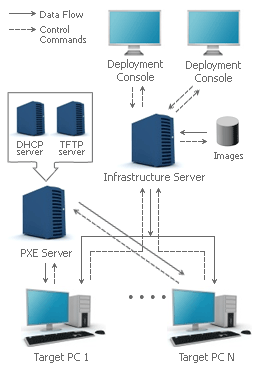
 Deployment Console for centralized initiation, management and monitoring of deployment sessions.
Infrastructure Server is the crucial element of the program's architecture to deliver images to target computers.
PXE Server to remotely boot client computers via LAN. Integration with an external DHCP server.
 Boot Media Builder to create bootable CD/DVD or PXE images based on Linux/DOS and WinPE 3.0.
 Hard Disk Manager for PC maintenance, backup, migration, optimization and recovery.
Adaptive Imaging Tools to prepare a universal image for further deployment to various machines.
Manufacturer News
Manufacturer News
Support Center
For technical support email or call us on:
- support@tituscorp.co.za
- Tel: 27 (0) 11 705 1930
- Fax: 27 (0) 11 705 1644


